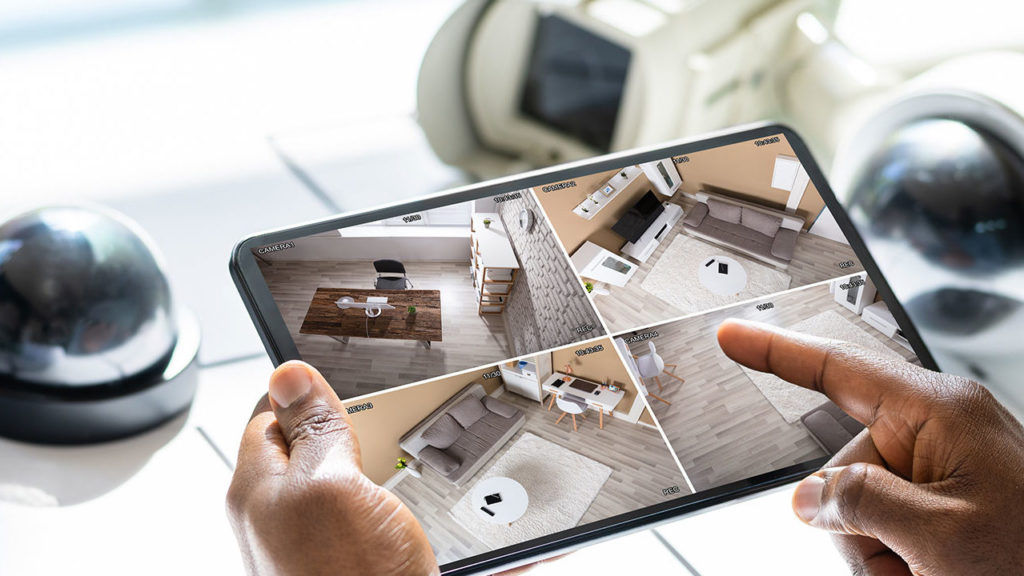
Security technology for commercial properties has changed substantially in the past few years. Systems that once required separate vendors, contracts, and monitoring relationships are now integrated into unified platforms. Cloud-based video storage has become a practical standard rather than an emerging option. Access control has moved from key cards to mobile credentials and biometrics. Businesses of all sizes are recognizing that piecemeal security setups create voids that a structured approach does not.
This guide covers what commercial security systems include in 2026, how different components work together, what different business types need, and how to think about building or upgrading a security program that protects your people, assets, and operations.
What Is Included in a Commercial Security System?
A commercial security system is not a single product. It is a set of technologies and services working together to detect threats, deter unauthorized activity, document incidents, and trigger a response when something goes wrong. For most commercial properties, a complete system includes some combination of the following:
Intrusion Detection and Burglar Alarms
The foundation of most commercial security programs is an intrusion detection system, such as sensors, motion detectors, door and window contacts, and a control panel to monitor it all. When a breach is detected, the panel triggers an alarm and transmits a signal to a 24/7 monitoring center that dispatches a response.
State-of-the-art intrusion detection systems can have zones which are armed or disarmed independently, scheduled to match your operating hours, and have alerts sent directly to designated personnel. Advanced alarm systems for commercial properties range from straightforward perimeter protection for smaller spaces to complex multi-zone configurations for large facilities.
Video Surveillance
Video surveillance serves two distinct functions: deterrence and documentation. Visible cameras reduce opportunistic theft and unauthorized entry. Recorded footage provides the visual and physical evidence needed for insurance claims, law enforcement investigations, and internal incident reviews.
In 2026, most commercial installations use IP-based cameras with high-resolution capture, night vision, and remote viewing capability. The footage can be stored in on-site hardware, cloud servers, or in a hybrid of both depending on your retention requirements, bandwidth, and budget. Cloud video versus on-premise storage each have trade-offs worth understanding before committing to a storage architecture.
Camera placement matters as much as camera quality. Entry and exit points, loading docks, parking areas, server rooms, cash handling areas, and high-value inventory zones are typical priorities. An experienced provider can perform a video surveillance assessment which will identify coverage inconsistencies that are not obvious from a floor plan alone.
Access Control
Access control helps businesses manage who can go where, when. For commercial properties, this means authorizing entry to the building itself as well as accessing restricted areas within it.
Commercial access control systems use key fobs, smart cards, mobile credentials, or biometric readers. Permissions are managed centrally and an employee’s access can be added, modified, or instantly revoked without changing physical locks or collecting keys. Every access event is logged, giving you a timestamped record of who entered which area and when.
For businesses with multiple locations, cloud-based access control allows permissions to be managed across all sites from a single platform.
Central Station Monitoring
24/7 central station monitoring connects alarm, video, and access systems to a UL-listed monitoring center that receives signals and dispatches emergency responders around the clock.
A monitored system also supervises itself. If a sensor goes offline, a communicator loses connectivity, or a panel develops a fault, the monitoring center is alerted before the gap in protection becomes a real problem.
Environmental and Life Safety Integration
Many commercial security platforms now integrate fire alarm signals, carbon monoxide detection, and water leak sensors alongside intrusion and access systems. This creates the opportunity to manage security, life safety, and response protocols together with one company rather than separately from several different providers.
What Should Businesses Install First?
The answer depends on your primary risk, but a practical framework for most commercial properties looks like this:
- Start with intrusion detection and monitoring. A burglar alarm connected to a 24/7 monitoring center addresses the most immediate and basic risk while also establishing the monitoring relationship the other components will eventually connect to.
- Add access control to your highest-risk entry points. If there are restricted areas or high-value inventory, access control at those specific points can help address operational and security risks.
- Layer in video surveillance for documentation and deterrence. Cameras at primary entry and exit points, parking areas, and high-value zones provide coverage for the incidents most likely to generate an insurance claim or law enforcement report.
- Build toward integration. A fully integrated security system gives you better situational awareness, eliminates the blind spots between disconnected systems, and simplifies management. This is the direction most commercial security deployments are moving in 2026, and it is worth keeping integration capability in mind even when you are making early-stage component decisions.
Security Needs by Business Type
Different commercial environments have meaningfully different security profiles. A one-size-fits-all approach tends to either over-engineer low-risk areas or under-protect high-risk ones.
Office Buildings and Professional Services
The primary concerns for office environments are after-hours intrusion, internal access control for sensitive areas (server rooms, HR files, executive suites), and visitor management. Video at entry points and a reliable intrusion system with after-hours monitoring cover most of the risk profile. Access control adds the ability to manage employee and visitor access without the administrative burden of physical key management.
Retail
Retail security must balance customer experience with theft prevention. Visible camera coverage throughout the sales floor, at points of sale, and in stockrooms addresses both internal and external theft. Access control for stockrooms and back offices limit internal exposure. Intrusion detection with monitoring covers after-hours risk. For multi-location retailers, centralized management of all sites from a single platform can simplify operations.
Warehouses and Distribution
Security systems for warehouses need to address large footprints, multiple access points, high-value inventory, and a workforce that may include contractors and temporary staff alongside permanent employees. Perimeter protection, loading dock coverage, and zone-based access control are priorities. Camera systems need to cover wide areas efficiently, which often means a combination of fixed cameras at key points and wide-angle or pan-tilt-zoom cameras for broader coverage. Access control by zone limits exposure from staff whose access should be limited to specific areas.
Healthcare and Medical Offices
Healthcare facilities face a specific combination of security and compliance requirements. Patient privacy regulations impact where cameras can be placed and how footage is stored. Drug storage areas require controlled access with detailed audit trails. Visitor management matters both for safety and for HIPAA compliance. The right security partner for a healthcare environment understands these constraints and designs accordingly.
Multi-Tenant and Mixed-Use Properties
For property managers overseeing buildings with multiple tenants, security responsibilities require careful coordination. Common areas, parking structures, and building entry points are typically the landlord’s responsibility; tenant spaces may be individually secured. A commercial security system architecture can support multiple independently managed zones under a single building-wide platform.
What Has Changed in 2026
A few developments in commercial security technology are worth understanding as you evaluate or update your current setup.
- Advanced analytics supported by AI have become broadly accessible. Today, surveillance platforms can flag motion, detect objects left behind, identify license plates, and send alerts for specific behaviors. This can help reduce the time operators spend reviewing footage and improving the signal-to-noise ratio for monitoring purposes.
- Mobile-first access control is now expected in many industries and has nearly replaced key card systems in 2026. Employees use their smartphones as credentials, eliminating the card issuance and collection burden and making remote credential management straightforward. Lost credentials are revoked from an app rather than tracked down physically.
- Cloud-based system management means that for most business types, security system administration no longer requires on-site hardware or on-site IT support. Alarm panels, access controllers, and cameras can be configured, monitored, and updated remotely.
- Unified platforms are now a realistic option for mid-sized commercial properties. This means that intrusion, access, video, and environmental sensors can all be seen on a single dashboard.
Choosing a Commercial Security Provider
Technology is only part of the equation. The provider you work with determines how well it is designed, installed, maintained, and supported over time.
Key factors to evaluate:
- Licensing and credentials. Security providers are licensed at the state level, and licensing requirements vary by state. Verify that any provider you consider holds the appropriate licenses for your jurisdiction and that their technicians are certified for the systems they install.
- Local presence. A provider with local technicians in your market means faster response for service calls, familiarity with local inspection requirements, and a working relationship with local law enforcement and emergency services. Finding a provider near you matters as much as finding the right technology.
- Full-service capability. Design, installation, monitoring, inspection, and service ideally come from a single provider. When different vendors are responsible for different parts of the same system, coordination gaps can develop.
- Integration capability. If fire protection and security are managed by different providers, confirm that they can work together on integration or consider whether consolidating both under one relationship makes more sense for your property.
- Scalability. The security system you install today should be designed to grow with you without requiring a full replacement every few years.
Frequently Asked Questions
What is the difference between a monitored and an unmonitored security system?
A monitored system transmits alarm signals to a UL-listed central station that dispatches emergency responders around the clock, without depending on anyone at the building to notice and react. For commercial properties, monitoring is required by most insurers and by code for many occupancy types.
How long does commercial security system installation take?
The timeline depends on the scope of the system. A straightforward intrusion and monitoring installation for a small commercial space may take a single day. A multi-system deployment with access control, cameras, and integrated monitoring across a larger facility typically takes several days to a week, plus design and permitting time before installation begins.
Can security and fire alarm systems be managed together?
Yes, and for most commercial properties it makes sense to do so. Integrating fire alarm and security under a single monitoring relationship simplifies compliance management, eliminates coordination gaps between systems, and gives you a single point of accountability for your entire protection program.
What should a business install first?
For most businesses starting from scratch, intrusion detection connected to 24/7 monitoring is the highest-priority first step. It addresses the most universal risk at the lowest cost and establishes the monitoring relationship that other components will integrate into. Access control and video surveillance are typically added next, with full integration as a longer-term goal.
What is included in a commercial security system?
A complete commercial security system typically includes intrusion detection and burglar alarms, video surveillance, access control, and 24/7 central station monitoring. More advanced deployments also integrate environmental sensors for fire, carbon monoxide, and water. The right combination depends on your occupancy type, risk profile, and operational requirements.
Let Pye-Barker Manage It For You
Pye-Barker’s business security solutions cover the full range of commercial security needs: threat detection, professional monitoring, with integrated access and control, designed and installed by licensed technicians with local presence across the country.